E-Commerce SEO 2026: Optimize Product Pages for Google
E-Commerce SEO 2026: How to Optimize Product and Category Pages for Google
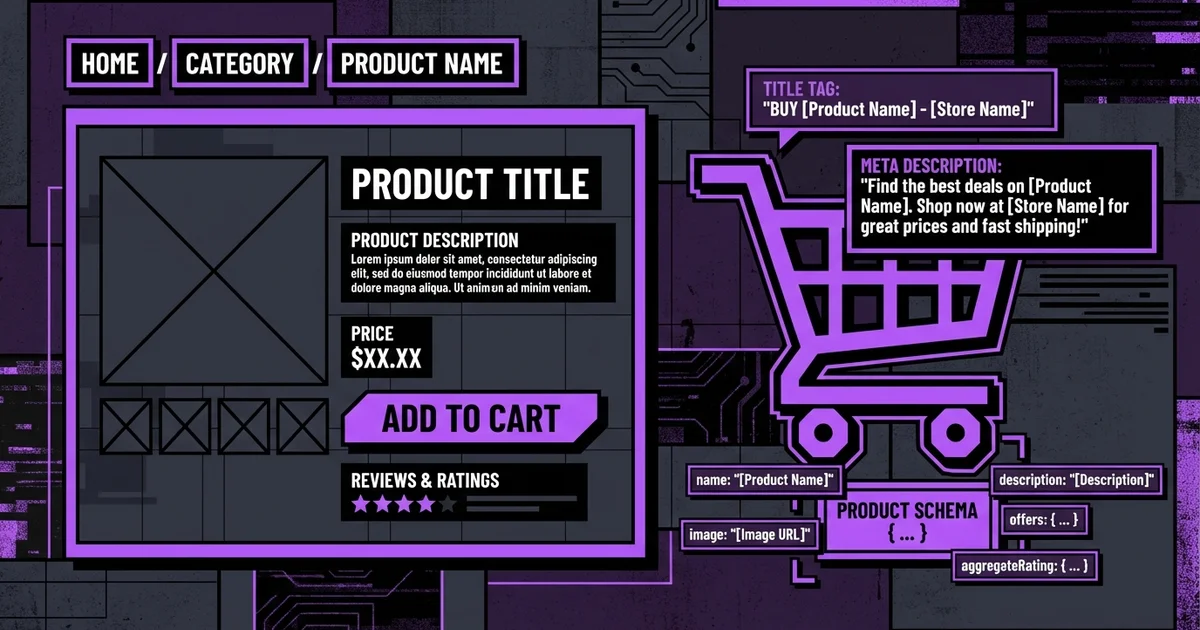
What is E-Commerce SEO? E-commerce SEO is the process of optimizing an online store so its product and category pages rank in organic search results. It covers URL architecture, product metadata, structured data (Product schema), duplicate content from faceted navigation, internal linking through breadcrumbs and image optimization for both search visibility and Core Web Vitals performance. Free Consultation →
Most e-commerce sites leave significant organic traffic on the table because they focus on home page SEO while neglecting the pages that actually convert: product pages and category pages. This guide covers the full technical and content optimization stack for both page types, with platform-specific advice for Shopify, WooCommerce and custom Next.js stores.
Table of Contents
- Why E-Commerce SEO Is Uniquely Challenging
- Category Page SEO Architecture
- Product Page Title and Meta Structure
- Product Schema and Review Schema
- Faceted Navigation and Duplicate Content
- Canonical Tags in E-Commerce
- Internal Linking with Breadcrumbs
- Image Optimization for Product Pages
- E-Commerce Platform SEO Comparison
- Core Web Vitals in E-Commerce
- Step-by-Step Product Page Optimization Guide
- Frequently Asked Questions
- Conclusion
Why E-Commerce SEO Is Uniquely Challenging {#why-challenging}
Standard content sites have a manageable page count and relatively stable URL structures. E-commerce sites can have tens of thousands of product pages, dynamically generated filter URLs creating millions of parameter combinations, and inventory that changes daily — adding, removing and modifying products constantly.
These characteristics create SEO challenges at scale:
- Duplicate content: Filter parameters generate near-identical pages (same products, different sort order)
- Thin content: Short product descriptions repeated across multiple SKU variants
- Crawl waste: Googlebot crawls infinite parameter combinations instead of canonical product pages
- Orphan pages: Products added to inventory without category page placement have no internal links
- Cannibalization: Multiple pages targeting the same product keyword compete against each other
Solving these at the architectural level — before launching thousands of products — is far more effective than fixing them retroactively. Our web design services build e-commerce SEO architecture into the initial site structure.
Category Page SEO Architecture {#category-pages}
Category pages are often your highest-traffic SEO entry points. Users searching "men's running shoes" land on a category page, not a product page. Category pages must be optimized as landing pages with commercial intent.
URL Structure for Categories
Use short, descriptive, hierarchical URLs:
- Good:
/shoes/running/mens - Bad:
/category/12345?filter=running&gender=men
Keep URLs human-readable, use hyphens not underscores, and avoid unnecessary nesting beyond 3 levels. For large product taxonomies, flatten the hierarchy where possible — deeply nested URLs dilute internal link equity.
Category Page Content Requirements
Category pages frequently have thin content because merchandising teams focus on product listings. SEO requires at minimum:
- Unique H1 with the target category keyword
- 200-400 word introductory text above the product grid (with keyword-rich headings)
- Below-fold content expanding on the category: buying guides, FAQs, subcategory links
- Breadcrumb navigation (signals hierarchy to Google and users)
- Unique meta title and description for every category
Pagination
Use rel="next" and rel="prev" link tags for paginated category pages. Set canonical on each page to itself (not to page 1). This tells Google that each page has unique content worth indexing rather than being a duplicate of page 1.
Product Page Title and Meta Structure {#product-titles}
Product page titles drive CTR from Google's SERPs. A poorly structured title wastes the ranking equity you have built.
Title Patterns by Intent
| Search Intent | Title Pattern | Example |
|---|---|---|
| Transactional | [Product Name] — Buy [Category] Online | Nike Air Max 90 — Buy Running Shoes Online |
| Branded | [Brand] [Product] [Key Attribute] | Nike Air Max 90 White/Red Size Guide |
| Comparison | [Product] Review [Year]: Is It Worth It? | Nike Air Max 90 Review 2026: Is It Worth It? |
| Local | Buy [Product] in [City] | Buy Running Shoes in Istanbul |
Meta Description for Products
Product meta descriptions should include:
- The product name and key differentiator
- A benefit-focused statement (not just features)
- Price range or "Free shipping" if applicable
- A call to action
Example: "Nike Air Max 90 in 12 colorways. Iconic cushioning for everyday wear. Free delivery on orders over 500 TL. Shop now."
Product Title Tag Formula
| `[Product Name] | [Brand] | [Category] | [Store Name]` |
|---|
Keep total character count under 60. Prioritize product name and brand — these are what users scan for in search results.
Product Schema and Review Schema {#product-schema}
Product schema is one of the highest-impact SEO changes available to e-commerce stores. Correctly implemented, it enables price, availability and review rating rich results in Google — driving significantly higher CTR from the same ranking position.
Product Schema Fields
| Field | Required | Description |
|---|---|---|
| name | Yes | Product name |
| description | Recommended | Product description |
| image | Yes | Product image URL |
| sku | Recommended | Stock keeping unit |
| brand | Recommended | Brand name |
| offers | Yes | Price and availability |
| aggregateRating | Recommended | Review count and average |
| review | Optional | Individual reviews |
{
  "@context": "https://schema.org",
  "@type": "Product",
  "name": "Product Name",
  "image": "https://example.com/product.jpg",
  "brand": { "@type": "Brand", "name": "Brand Name" },
  "offers": {
    "@type": "Offer",
    "price": "99.00",
    "priceCurrency": "TRY",
    "availability": "https://schema.org/InStock",
    "url": "https://example.com/product"
  },
  "aggregateRating": {
    "@type": "AggregateRating",
    "ratingValue": "4.7",
    "reviewCount": "142"
  }
}
Always keep offers.availability in sync with actual inventory. Google can demote product pages that show InStock schema for out-of-stock products — this is a trust signal violation.
Faceted Navigation and Duplicate Content {#faceted-navigation}
Faceted navigation (filter systems on category pages) is the most common source of duplicate content on e-commerce sites. When users filter by color, size or price, the URL changes but the page structure remains nearly identical, creating thousands of crawlable duplicate pages.
Solutions by Approach
Option 1: Block via robots.txt Disallow parameter URLs in robots.txt:
Disallow: /*?color=
Disallow: /*?size=
Disallow: /*?sort=
Prevents crawl waste but removes any ranking potential for filtered pages.
Option 2: rel="canonical" on filtered pages Set all filtered URLs to canonical the base category page. Google consolidates the signals to the canonical. Best for filters that create sorting/display variations without unique content value.
Option 3: noindex on filtered pages Add <meta name="robots" content="noindex, follow"> to filtered pages. Allows Googlebot to follow links on these pages (distributing PageRank) without indexing the pages themselves.
Option 4: Use JavaScript-only filtering (hash-based URLs) Filter changes update the URL hash (#color=red) rather than query parameters. Hash URLs are not indexed by Google. This is the cleanest technical solution for client-side filtering but requires careful implementation to avoid breaking the user experience on direct links.
For most e-commerce sites, a combination of canonical tags (for sort/display filters) and JavaScript-based filtering (for product attribute filters) provides the best balance of crawl efficiency and user experience.
Canonical Tags in E-Commerce {#canonical-tags}
Beyond faceted navigation, canonical tags solve several other e-commerce duplicate content scenarios:
- Product variants: Color/size variants often have separate URLs. Canonical all variants to the main product page unless each variant has significantly different content and search demand.
- Pagination: Each paginated category page should have a self-referencing canonical, not all pointing to page 1.
- Session IDs: If your platform appends session IDs to URLs, block them in robots.txt and set canonical tags.
- Print pages: Block print-friendly URL variants (
?print=1) in robots.txt.
Audit your canonical implementation quarterly — e-commerce platforms regularly introduce new parameter types as features are added.
Internal Linking with Breadcrumbs {#breadcrumbs}
Breadcrumb navigation is the most efficient internal linking mechanism for large e-commerce sites. Every product page breadcrumb creates an internal link back through the category hierarchy to the homepage, distributing link equity systematically without manual effort.
Breadcrumb Requirements for SEO
- Implement as HTML navigation with visible text links (not JavaScript-rendered)
- Add BreadcrumbList schema matching the visible breadcrumb
- Use descriptive anchor text matching category names (keyword-rich naturally)
- Ensure breadcrumb hierarchy matches URL hierarchy
- Link all levels: Home > Category > Subcategory > Product
Cross-Selling Internal Links
Product pages should link to related products and relevant category pages. "Frequently bought together" and "Customers also viewed" sections create internal link networks that distribute PageRank and improve crawlability. Ensure these sections render in the initial HTML — JavaScript-rendered internal links provide less SEO value.
Our SEO consulting services audit internal link architecture as part of every e-commerce SEO engagement. See our packages for details.
Image Optimization for Product Pages {#image-optimization}
Product images are almost always the LCP element — the largest content paint on the page. Unoptimized product images cause slow LCP scores that suppress rankings and increase bounce rates.
Image Optimization Checklist
- [ ] Convert all product images to WebP format
- [ ] Set explicit
widthandheightattributes to prevent CLS - [ ] Use Next.js
<Image>or equivalent for automatic optimization - [ ] Add
priorityprop to the first/hero product image - [ ] Write descriptive alt text: "[Product Name] [Key Attribute] [Color]" pattern
- [ ] Compress images without visible quality loss — aim for < 150KB for product images
- [ ] Use
srcsetto serve appropriate sizes for different viewports - [ ] Lazy load all images below the fold
Alt Text for Products
Alt text serves both SEO (image search ranking, page relevance signals) and accessibility. Pattern: [Brand] [Product Name] [Color/Material] [Category]. Example: "Nike Air Max 90 White Leather Running Shoe."
E-Commerce Platform SEO Comparison {#platform-comparison}
| Feature | Shopify | WooCommerce | Next.js (Custom) |
|---|---|---|---|
| URL customization | Limited | Full | Full |
| Technical SEO control | Limited | Good | Complete |
| Schema implementation | Plugin-dependent | Plugin-dependent | Manual (full control) |
| Core Web Vitals | Moderate | Variable | Excellent |
| Faceted navigation handling | Limited | Plugin-dependent | Custom (best) |
| Canonical tag control | Partial | Full | Full |
| sitemap generation | Automatic | Plugin | sitemap.ts |
| Headless capability | Yes (Hydrogen) | Limited | Native |
| Developer expertise required | Low | Medium | High |
For enterprise e-commerce with complex SEO requirements, custom Next.js builds offer the most control. For businesses prioritizing time-to-market, Shopify or WooCommerce with careful plugin selection can achieve strong SEO with the right configuration.
Core Web Vitals in E-Commerce {#cwv}
E-commerce sites face particular Core Web Vitals challenges due to:
- Large, high-resolution product images (LCP)
- Heavy JavaScript for cart, wishlist and filter functionality (INP)
- Dynamically loaded recommendations (CLS)
LCP on Product Pages
Identify your LCP element with PageSpeed Insights or Lighthouse. On product pages it is almost always the main product image. Preload it, optimize its format and size, and serve it from a CDN.
INP on E-Commerce
Cart and filter interactions are the most common INP failures on e-commerce sites. Heavy React component trees re-rendering on filter changes cause interaction delays. Solutions: virtualize long product lists, debounce filter inputs, and use server-side filtering with ISR rather than client-side JavaScript filtering for large catalogs.
CLS from Dynamic Recommendations
"Recommended products" sections loaded via JavaScript after page render push down existing content, causing CLS. Always reserve explicit height for these sections using CSS before the content loads. Alternatively, render recommendations server-side.
Step-by-Step Product Page Optimization Guide {#how-to}
Step 1: Audit your current product page template. Identify the title tag pattern, meta description pattern and whether Product schema is implemented. Check for faceted navigation duplicate content in Google Search Console's Coverage report.
Step 2: Fix the title and meta template.
| Update your product page title template to the [Product Name] | [Brand] | [Store Name] pattern. Ensure meta descriptions include price or key benefit and a call to action. |
|---|
Step 3: Implement Product schema. Add JSON-LD Product schema to every product page. If your platform does not support it natively, add it via a custom template or plugin. Validate on 10 sample products with Google's Rich Results Test.
Step 4: Audit and fix faceted navigation. Identify which filter parameters create indexable duplicate pages. Implement canonical tags for sort and display parameters. Block crawl-waste parameters in robots.txt or switch to hash-based filtering.
Step 5: Optimize category page content. Add unique introductory content to your top 20 category pages. Prioritize by traffic potential — start with your highest-volume categories.
Step 6: Optimize product images. Run your product image directory through a batch conversion tool. Switch to WebP, add explicit dimensions and implement lazy loading. Measure LCP improvement with Lighthouse.
Step 7: Audit internal linking. Identify products with no internal links (orphan pages) using a crawl tool like Screaming Frog. Add these products to relevant categories and cross-sell sections.
Step 8: Set up ongoing monitoring. Configure Google Search Console to alert on coverage errors, sitemap issues and Core Web Vitals regressions. Review monthly.
Frequently Asked Questions {#faq}
How do I handle out-of-stock products from an SEO perspective? Keep the page live with updated schema (availability: OutOfStock) and add an estimated restock date if possible. Redirect only if the product is permanently discontinued with no replacement. Redirecting temporarily out-of-stock pages to category pages destroys any ranking equity the product page has accumulated.
Should product pages target branded or generic keywords? Both. Your title and H1 should include the product name (branded) as the primary keyword. Your description and alt text should include generic category terms that non-brand-aware searchers use. Both keyword types have conversion potential — branded queries convert higher, generic queries have higher volume.
What is the best way to handle product variants (color/size) from an SEO standpoint? If variants have unique search demand (e.g., "Nike Air Max 90 Red" has significant search volume), create separate pages with canonical pointing to the main product. If variant differences are minor, keep one page and use URL parameters for variant selection — canonical all parameter URLs to the base product URL.
How many products can I have on a single category page before pagination is needed? From a user experience standpoint, 24-48 products per page is typical. For SEO, ensure your most important products appear on page 1 (no pagination required to reach them). Use internal link signals and category position to control which products Google considers most important within a category.
Does product review count affect SEO beyond schema rich results? Yes. Review content creates unique text on product pages, addressing long-tail queries that your structured product description may not cover. Each review adds new keyword-rich content. Platforms that aggregate review content below the fold see measurable organic traffic improvements from high-review-count products.
How do I optimize for "best [product category]" informational searches? Create blog content or buying guides targeting these informational queries. Internal link from the guide to relevant category and product pages. This captures top-of-funnel traffic and guides it toward conversion through your internal linking structure. See our blog for content strategy examples.
What causes the most crawl budget waste on e-commerce sites? Faceted navigation parameter URLs are the primary cause — an e-commerce site with 10 filter types applied across 1,000 category pages can generate millions of unique URLs. Secondary causes: session IDs in URLs, tracking parameters not blocked by robots.txt, infinite scroll creating unique per-scroll URLs, and pagination extending beyond page 10.
How does the e-commerce SEO approach differ for Shopify vs WooCommerce vs custom builds? Shopify has the least URL and technical SEO control — you cannot change the /products/ and /collections/ URL structure. WooCommerce offers more flexibility but relies heavily on plugins like Yoast or Rank Math for schema. Custom Next.js builds give complete control over every technical SEO element but require developer resources to implement correctly. Visit our contact page to discuss which approach fits your business.
Conclusion {#conclusion}
E-commerce SEO requires solving problems at scale. The product page template you optimize today applies to every product you add in the future. The faceted navigation solution you implement correctly prevents millions of duplicate pages from accumulating. The Product schema you deploy today enables rich results across your entire catalog.
Focus on architecture first: get your URL structure, canonical strategy and schema implementation correct before adding content. Then build category page content and product description quality systematically, starting with your highest-traffic pages.
Our team at Modern Web SEO specializes in e-commerce SEO for stores built on Shopify, WooCommerce and custom Next.js stacks. Explore our services, packages and portfolio to see what we have built.
| Related reading: Technical SEO Services | Web Design Services | Next.js SEO Guide |
|---|