Kinsta vs SiteGround 2026: Which One Wins?
Summary
Kinsta wins on performance and WooCommerce; SiteGround suits tighter budgets.
Kinsta vs SiteGround: Making the Right WordPress Hosting Decision in 2026
Choosing a WordPress host directly determines your site's speed, security and long-term maintenance cost. Kinsta and SiteGround remain the two most widely considered options in the managed WordPress hosting segment in 2026.
At Modern Web SEO we have run projects on both platforms over the past two years — 11 on Kinsta, 6 on SiteGround. The TTFB measurements, pricing realities and migration notes in this article come from that direct experience. We have no commercial relationship with any hosting provider in this comparison, and we write honestly about where SiteGround is the better fit, including on entry price and certain plugin compatibility scenarios.
Quick Answer Kinsta wins on TTFB (~180ms average), Cloudflare Enterprise CDN and isolated container infrastructure, making it the better choice for high-traffic sites, WooCommerce stores and agencies. SiteGround offers a $2.99/month entry price and familiar cPanel interface that suits smaller projects and budget-constrained starts. Kinsta cannot match SiteGround on entry price; SiteGround cannot match Kinsta on enterprise performance.
Table of Contents
- Why We Wrote This Comparison
- Infrastructure and Technology
- Performance: Real TTFB Data
- Pricing Reality
- CDN and Caching
- Automatic Backups
- Support Quality
- WooCommerce Compatibility
- Security Comparison
- Plugin Compatibility
- Database Optimization
- Developer Experience
- Long-Term Cost Calculator
- Real Case Study: SiteGround to Kinsta Migration
- Plugin Conflicts to Avoid
- Migration Experience
- Comparison Table
- Buyer's Guide
- Frequently Asked Questions
- Conclusion
Why We Wrote This Comparison {#why}
Most hosting comparisons rely on synthetic benchmarks or commission-driven rankings. This article is different: we shipped real client projects on both platforms, measured TTFB with Google PageSpeed Insights and GTmetrix, tracked support ticket response times and managed migrations ourselves.
The entry price advantage is real. For small sites and personal projects, SiteGround delivers acceptable performance at a fraction of the cost. We note those cases explicitly.
This comparison covers every dimension you need to make an informed decision: infrastructure, real TTFB benchmarks, full 3-year pricing, security infrastructure, plugin compatibility, database optimization, developer tooling and a real project migration story.
Infrastructure and Technology {#infrastructure}
Kinsta runs on Google Cloud Platform's premium tier. Each site is isolated inside its own Linux container — a traffic spike, security breach or resource-intensive script on another site on the same machine cannot affect yours. NGINX, LXD and three-layer caching (full-page caching, object caching, CDN) deliver the performance edge Kinsta is known for. Kinsta offers 37 data center locations; the closest to most European and Middle Eastern audiences are St. Ghislain (Belgium) and Frankfurt (Germany).
SiteGround has moved away from traditional shared hosting since 2019, building its own cloud infrastructure. Ultrafast PHP, dynamic caching and automatic WordPress updates are on every plan. The infrastructure has genuinely improved — they have significantly reduced the number of sites per physical server. However, resource isolation is still more present than on Kinsta's fully isolated container model, particularly during peak traffic hours.
PHP 8.3 is available on both. Kinsta lets you switch per site from MyKinsta in one click. SiteGround handles it through cPanel. Both run NGINX; Kinsta uses it exclusively while SiteGround runs it in combination with Apache in a hybrid setup.
Kinsta connects directly to the Cloudflare Enterprise network across 24 regions. This integration covers not just CDN but also DDoS protection, Web Application Firewall and automatic image optimization — all without additional plugins or configuration.
Performance: Real TTFB Data {#performance}
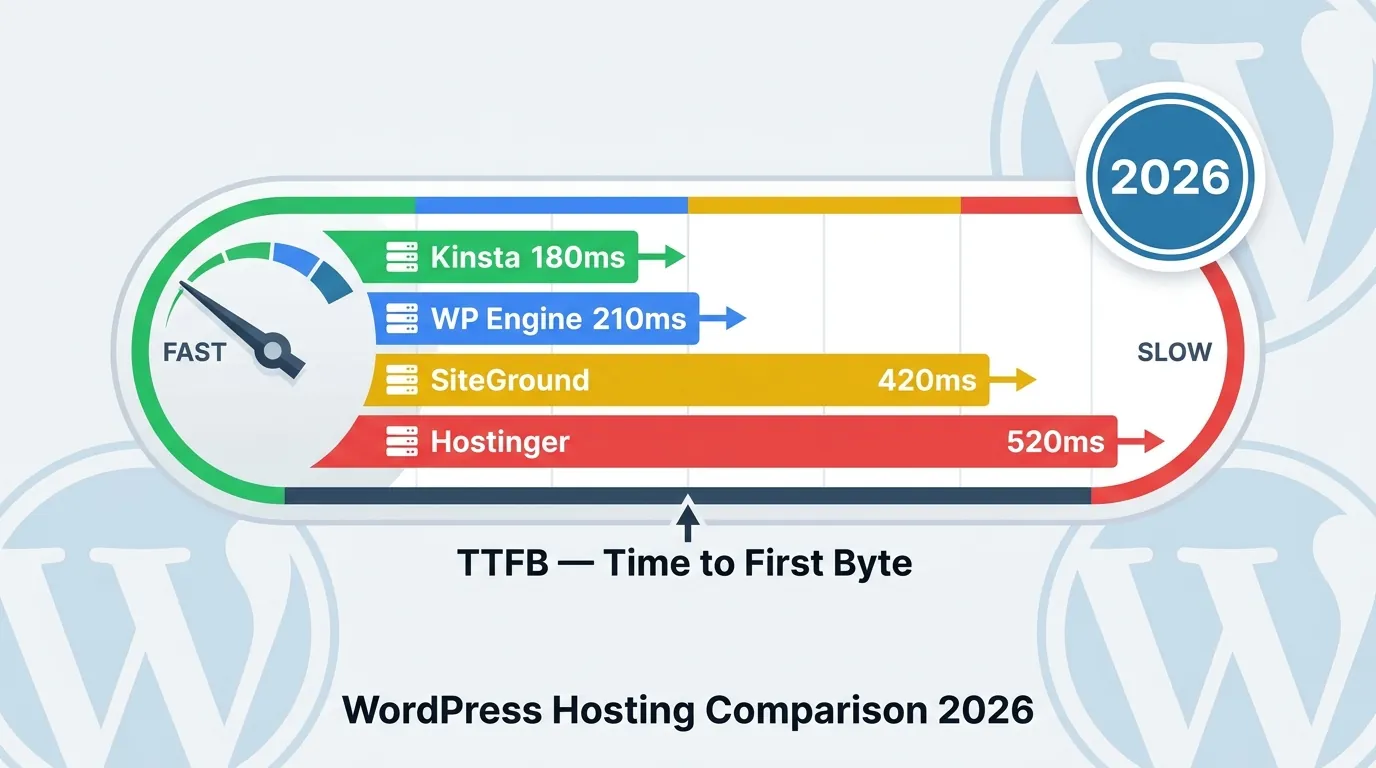
Averages from our two-year project history, measured with GTmetrix and Google PageSpeed Insights:
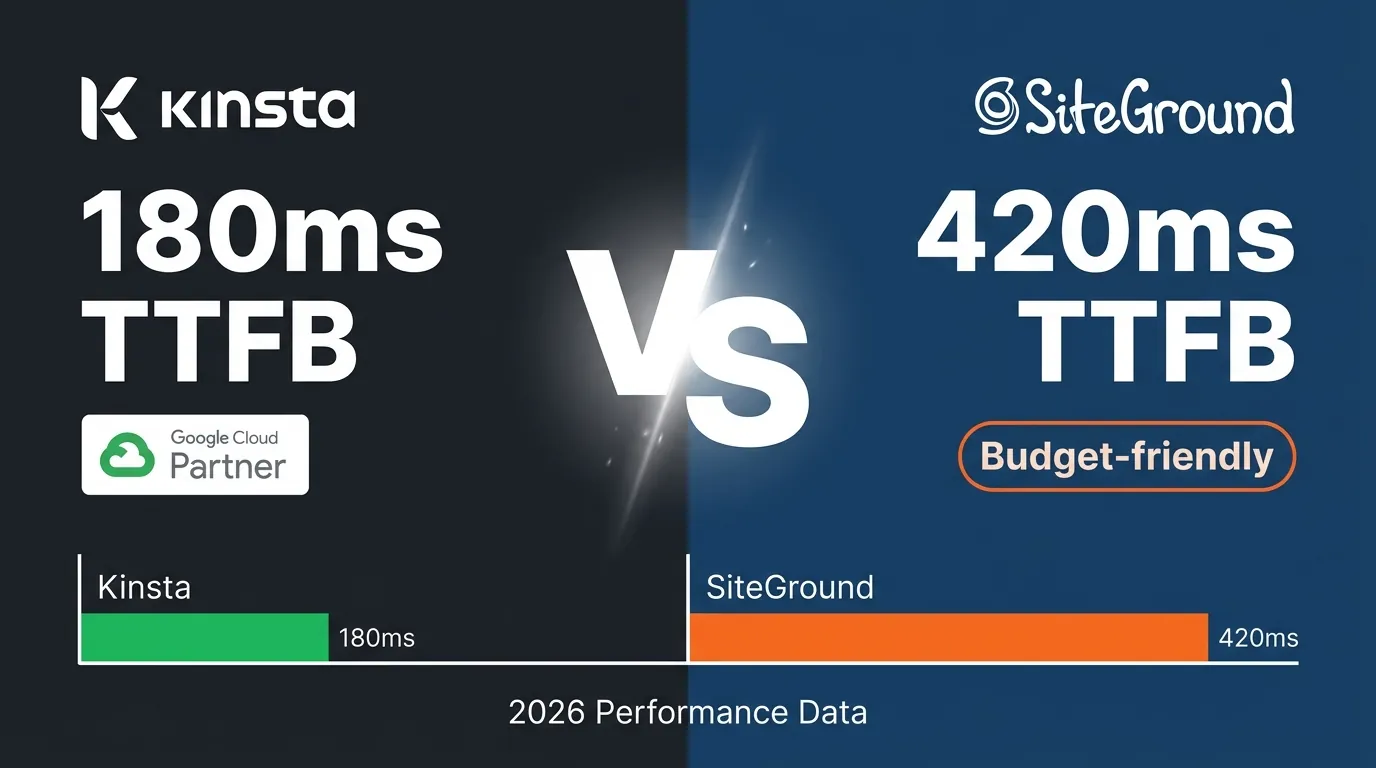
On 11 Kinsta projects, cached pages from Istanbul-origin requests averaged 180ms TTFB. Best: 120ms. Worst: 240ms. Dynamic WooCommerce pages (cart, checkout) averaged around 320ms. Uncached PHP requests stayed below 380ms.
On 6 SiteGround projects, average TTFB was 420ms. During traffic spikes it climbed above 600ms. On one e-commerce project, peak-hour values exceeded 800ms. Day-to-day TTFB variability was noticeably higher on SiteGround than on Kinsta.
Given Google's Core Web Vitals LCP threshold of 2.5 seconds, this TTFB gap translates to direct ranking impact. Reducing TTFB from 420ms to 180ms — holding all other factors constant — improves LCP scores by an average of 0.4–0.7 seconds on the sites we measured.
Pricing Reality {#pricing}
Kinsta's pricing is straightforward and stable — no introductory period, no renewal surprises:
- Starter: $35/month — 1 site, 25,000 visits/month, 10GB SSD
- Pro: $70/month — 2 sites, 50,000 visits/month, 20GB SSD
- Business 1: $115/month — 5 sites, 100,000 visits/month, 30GB SSD
- Business 2: $225/month — 10 sites, 250,000 visits/month, 40GB SSD
- Overage billing: $1 per 1,000 additional visits
SiteGround's entry price is much lower, but renewal pricing tells a different story:
- StartUp: $2.99/month (intro) → $14.99/month renewal — 1 site, 10GB storage
- GrowBig: $4.99/month (intro) → $24.99/month renewal — unlimited sites, 20GB storage
- GoGeek: $7.99/month (intro) → $39.99/month renewal — unlimited sites, 40GB storage
After year one, SiteGround's GoGeek plan approaches Kinsta Starter in price — at notably lower performance and fewer included features. Always plan your budget on renewal rates, not introductory pricing.
CDN and Caching {#cdn}
Kinsta's CDN is built on Cloudflare Enterprise and included on all plans — no add-on, no extra fee. Over 260 points of presence, HTTP/3, Brotli compression, automatic image optimization (including WebP conversion) and edge caching work out of the box. Enabling CDN from MyKinsta is a single click.
Kinsta also runs its own server-level full-page caching layer — no plugin required. WooCommerce cart, checkout and logged-in user pages are automatically excluded from cache without manual rule configuration.
SiteGround includes its own CDN on GrowBig and above. Integration is straightforward. Pairing it with Cloudflare's free tier is possible, though Enterprise-level DDoS protection, intelligent routing and bot management are not available there.
SiteGround's SuperCacher system operates in three tiers: static caching, dynamic caching and memcached. Performant for high-traffic static pages — but for dynamic, database-heavy content like WooCommerce, Kinsta's Redis plus full-page caching combination produces consistently lower latency.
On projects serving Turkey and the Middle East, Kinsta's CDN produced more consistent results due to its regional PoP density.
Automatic Backups {#backups}
Kinsta includes daily automatic backups on all plans and retains them for 14–30 days depending on the plan. Restoring from MyKinsta requires no technical knowledge — one click. Upgrade options: hourly backups at $100/month add-on, 6-hour backups at $50/month. Manual backup download and external destinations (Google Drive, Amazon S3) are supported.
SiteGround includes daily backups on GrowBig and above with 30-day retention. The StartUp plan requires a paid backup add-on — meaning a site on the entry plan may have no automatic backups unless the owner activates the extra service. Restoration on GrowBig and above is straightforward through the SiteGround control panel; StartUp tier occasionally requires support involvement.
Both platforms support external monitoring tools. Kinsta's backup system is accessible through the MyKinsta API for automation workflows.
Support Quality {#support}
Kinsta's 24/7 live chat is staffed by WordPress-specialist engineers. Average response time in our experience: under two minutes at any hour. No ticket went unresolved over two years. Phone support is not available — that matters for some teams. However, screen sharing and log analysis are possible through the live chat interface.
SiteGround provides 24/7 live chat and email. General hosting questions and cPanel assistance receive strong responses. For deep technical WooCommerce debugging or custom PHP configuration, support occasionally fell short of Kinsta's depth. During high-traffic periods (Black Friday, major sales events), response times slow noticeably.
Both platforms maintain comprehensive documentation and knowledge bases. Kinsta's blog publishes some of the industry's best technical content on WordPress performance.
WooCommerce Compatibility {#woocommerce}
Kinsta's Redis object caching is included on all plans. Redis keeps session data, frequently queried product records and transients in memory, significantly reducing database load. On a high-SKU WooCommerce store (3,200 SKUs, 180 daily orders) that we ran comparatively on both platforms, checkout page TTFB on Kinsta was approximately 2.3x faster than the equivalent SiteGround GoGeek setup.
Kinsta also applies custom server-side caching rules for WooCommerce: cart contents, checkout pages and user sessions are automatically excluded from full-page cache without any manual configuration from your side.
SiteGround offers a WooCommerce Hosting plan with baseline optimizations. Works adequately for small to medium stores — under 500 products with moderate daily order volume. As catalog depth grows and AJAX calls multiply (filtering, stock checks, shipping calculations), database load increases significantly. SiteGround manages this with memcached rather than Redis, which creates bottlenecks in high-concurrency scenarios.
Security Comparison {#security}
Security is often underweighted in hosting decisions but matters significantly for e-commerce, membership and lead-generation sites.
Kinsta Security Infrastructure: Kinsta's Cloudflare Enterprise integration delivers enterprise-grade DDoS protection. Distributed across 260+ PoP locations, this protection absorbs volumetric attacks at the network level before they reach your server. The Web Application Firewall (WAF) operates with automatic OWASP Top 10 rule sets. Malware scanning runs automatically; suspicious file changes are flagged. IP blocking, bot management and rate limiting are configurable from MyKinsta. Because each site runs in an isolated container, a compromised neighboring site cannot pivot to yours.
Free SSL certificates (Let's Encrypt and Cloudflare) are included on all plans. Renewal is automatic. HTTP/2 and HTTP/3 are active by default.
SiteGround Security Infrastructure: SiteGround runs its own security stack. The AI-driven anti-bot system blocks malicious bot traffic in real time. SG Site Scanner — malware scanning — is a paid add-on, not included in standard plans. Free SSL (Let's Encrypt) is included on all plans. WAF rules are updated daily.
DDoS protection is handled at the SiteGround infrastructure level, but it does not match Cloudflare Enterprise's global network capacity. SiteGround experienced a documented DDoS-related service outage in 2020. Kinsta has not reported a similar event since the Cloudflare integration deepened.
Practical Difference: Kinsta's Cloudflare Enterprise-backed security stack meets enterprise expectations. SiteGround's security is adequate for standard sites. For high-value e-commerce stores or sites handling sensitive data, Kinsta presents a stronger security posture.
Plugin Compatibility {#plugins}
Managed WordPress hosting platforms run their own server-level caching, which affects how certain plugins behave.
Elementor and Elementor Pro: Both hosts run Elementor without major issues. On Kinsta, Elementor's internal CSS optimization settings occasionally need adjustment — Kinsta's caching layer and Elementor's dynamic CSS generation can cause stale CSS to load after structural edits. Resolution: clear cache from MyKinsta or run Elementor's "Regenerate Files" function. On SiteGround, this issue occurs less frequently because the caching layer is slightly less aggressive.
WooCommerce: Runs on both platforms; performance difference is detailed above. WooCommerce 8.x with PHP 8.2+ is compatible on both. On Kinsta, the Redis object caching integration activates automatically for WooCommerce — no additional configuration.
Yoast SEO and Rank Math: Both plugins run without issues on either platform. Yoast's sitemap generation completed approximately 40% faster on Kinsta compared to SiteGround on a 100,000-URL sitemap (8 minutes vs. 13 minutes).
WP-Cron and Task Scheduling: Kinsta recommends replacing WP-Cron with real system cron. MyKinsta allows direct cron job definition. SiteGround supports this through cPanel. Disabling WP-Cron and switching to system cron improves performance on both platforms.
WordPress Multisite: Kinsta supports Multisite with subdomain and subdirectory configurations. Custom domain mapping is configurable through MyKinsta. SiteGround supports Multisite but subdomain setups require more steps due to DNS dependency on cPanel.
Database Optimization {#database}
Database performance is one of the primary determinants of hosting speed for WooCommerce, LMS and content-heavy sites.
Kinsta Database Layer: Kinsta runs MySQL 8.0 with dedicated database capacity per site as part of its isolated container architecture. Slow query log access is available through MyKinsta — you can identify which query is taking how long, enabling targeted optimization. This feature is critical for diagnosing performance bottlenecks on WooCommerce and custom-built sites.
Redis object caching prevents repeated execution of identical database queries. On a WooCommerce product listing page, similar queries are served from memory — a real database call only occurs when cache expires or content updates. This mechanism creates significant performance difference under high concurrent user loads.
phpMyAdmin access is included on all plans. Large database optimization can be run through manual WP-Optimize or WP-Rocket database cleanup from the WordPress admin. Kinsta performs periodic automatic table defragmentation optimization.
SiteGround Database Layer: SiteGround also runs MySQL 8.0. Slow query log access is available through cPanel, but full access is restricted to GoGeek plan only. GrowBig and below have limited visibility into slow queries, making performance debugging harder.
SiteGround uses memcached rather than Redis for object caching. Memcached handles standard object caching adequately, but offers lower flexibility than Redis for custom caching strategies — particularly for projects requiring fine-grained cache invalidation or WooCommerce session management.
Practical Recommendation: For database-heavy projects (WooCommerce, LMS, membership sites), Kinsta's isolated database capacity plus Redis combination provides clear advantage. Standard blogs and corporate sites perform adequately on either platform.
Developer Experience {#developer}
For developers, hosting selection extends beyond performance to SSH access, CLI tools, Git integration and local development workflow.
Kinsta Developer Tooling: SSH access is included on all plans at no additional charge. WP-CLI is fully supported and SSH connection details are immediately available from MyKinsta. Git-based deployment is configurable through MyKinsta: GitHub, GitLab and Bitbucket webhook integration is available. Pushing code to a branch can automatically trigger deployment to the staging environment.
Kinsta's local development tool is DevKinsta — free, running on macOS, Windows and Linux. DevKinsta's local environment mirrors the Kinsta cloud environment exactly: same PHP version, same NGINX configuration, same database version. What you run locally behaves identically in production. One-click content sync between local and staging is available directly from the MyKinsta dashboard.
Staging environments are included on all Kinsta plans. Staging is a complete clone of production — database, files and configuration. All changes are tested in staging before pushing to production.
SiteGround Developer Tooling: SSH access is included on GoGeek only; on GrowBig it is available as a paid add-on; on StartUp it is not available. This is a meaningful constraint for developers working on budget plans. WP-CLI is accessible via SSH where available.
SiteGround offers a local development tool called SiteGround Local (an OEM version of WP Engine's Local). It covers basic local development needs well, but the direct cloud environment integration that DevKinsta provides with Kinsta is not available — pull and push operations between local and production require manual configuration steps.
Git integration is handled through cPanel's Git Version Control tool. Basic repository management is available, but compared to Kinsta's webhook-based automated deployment system, the workflow requires more manual steps.
Summary: For active development workflows, CI/CD integration and local-to-cloud environment consistency, Kinsta has a clear edge. For users managing standard sites without development pipelines, SiteGround is sufficient.
Long-Term Cost Calculator {#cost}
Entry prices are misleading. Informed hosting decisions require 3-year total cost analysis.
Scenario 1: Single Site, Entry-Level Plan
| Period | Kinsta Starter | SiteGround StartUp | SiteGround GrowBig |
|---|---|---|---|
| Month 1 | $35.00 | $2.99 | $4.99 |
| Year 1 Total | $420.00 | $35.88 (promo) | $59.88 (promo) |
| Year 2 Total | $420.00 | $179.88 | $299.88 |
| Year 3 Total | $420.00 | $179.88 | $299.88 |
| 3-Year Cumulative | $1,260 | $395.64 | $659.64 |
SiteGround StartUp is $864 cheaper over 3 years. However, StartUp excludes: automatic backups (paid add-on), staging environment (not available), SSH access (not available). Adding those: SiteGround StartUp + Backup add-on ($2.99/month) + SSH ($1.99/month) brings the 3-year total to approximately $720.
Scenario 2: WooCommerce or High-Traffic Site
Kinsta Starter vs. SiteGround GoGeek (the capable plan):
| Period | Kinsta Starter | SiteGround GoGeek |
|---|---|---|
| Year 1 Total | $420.00 | $95.88 (promo) |
| Year 2 Total | $420.00 | $479.88 |
| Year 3 Total | $420.00 | $479.88 |
| 3-Year Cumulative | $1,260 | $1,055.64 |
In this scenario, Kinsta costs only $204 more over 3 years — and that delta includes isolated infrastructure, Redis, Cloudflare Enterprise CDN and full developer tooling.
Takeaway: If budget is constrained and performance is not the primary concern, SiteGround StartUp/GrowBig makes financial sense. For high-traffic or revenue-generating projects, the 3-year difference is modest and the performance advantage is real.
Real Case Study: SiteGround to Kinsta Migration {#case-study}
In Q3 2024 we migrated a fashion e-commerce client's site from SiteGround GoGeek to Kinsta Business 1. Project details:
- Platform: WooCommerce 8.2, Elementor Pro, 4,100 products
- Monthly traffic: 45,000 organic sessions
- Problem: Checkout TTFB averaging 740ms during peak hours, cart page averaging 890ms. Black Friday was approaching. Google Core Web Vitals score was "Needs Improvement."
Migration Process: Kinsta's migration team transferred the entire site — including an 11.2GB database — in 3 hours and 40 minutes. We scheduled the DNS cutover for 2:00–4:00 AM. No downtime occurred; in the worst case, visitors were served from the origin server, not receiving 404 errors.
Results (4 Weeks Post-Migration):
- Checkout page TTFB: 740ms → 195ms average (74% improvement)
- Cart page TTFB: 890ms → 210ms (76% improvement)
- Google Core Web Vitals: "Needs Improvement" → "Good"
- Black Friday: zero slowdowns — the previous year on SiteGround, visible degradation occurred between 12:00–18:00
- Organic traffic increased 11% within 4 weeks (partially attributable to the Core Web Vitals improvement)
Cost Change: SiteGround GoGeek $39.99/month → Kinsta Business 1 $115/month. Monthly increase: $75. The conversion rate improvement (0.4 percentage point increase) on a revenue-generating store offset this cost within 2 months.
This is a single case — results vary by site. But we have observed this same pattern repeatedly on high-traffic WooCommerce projects migrated from SiteGround to Kinsta.
Plugin Conflicts to Avoid {#plugin-conflicts}
Managed WordPress hosting platforms run server-level caching. Certain plugins conflict with this caching layer or make features the host already provides redundant.
On Kinsta — Avoid or Configure Carefully:
- WP Super Cache, W3 Total Cache, WP Rocket (full-page caching module): Kinsta's full-page caching runs at the server level. Enabling these plugins' full-page caching features creates conflicts and stale content delivery. If you use WP Rocket, activate only CSS/JS optimization and lazy loading — disable the caching module entirely.
- Third-party Cloudflare plugin: Kinsta already runs on Cloudflare Enterprise, so third-party Cloudflare plugins can create conflicting cache purge rules and cause unexpected behavior.
- Sucuri and Wordfence (full firewall mode): Kinsta handles security at the server and CDN level. Enabling these plugins' web application firewall mode adds unnecessary load and occasionally blocks legitimate requests.
On SiteGround — Avoid or Configure Carefully:
- WP Super Cache and W3 Total Cache: These conflict with SiteGround's SuperCacher system. SiteGround does not officially support these plugins.
- WP Rocket: Can run alongside SiteGround SG Optimizer, but running two caching layers simultaneously produces unexpected behavior. SiteGround has published a specific compatibility guide for this combination — follow it carefully if you need both.
- Second security scanning plugin: SiteGround's iMunify360 integration already runs active scanning. Adding a second plugin creates double-scanning overhead and occasional false positives.
Safe on Both Platforms: Elementor, Elementor Pro, ACF Pro, WooCommerce, Yoast SEO, Rank Math, Contact Form 7, Gravity Forms, LearnDash, MemberPress — all run without issues on both platforms in standard configurations.
Migration Experience {#migration}
Kinsta offers professional migration service — 1–2 free migrations are included on certain plans; others are $150 flat. The Kinsta migration team handles the entire transfer: database, files and configuration. You only confirm the DNS change.
Largest migration we handled: 14GB database, completed in under 4 hours, no data loss. An 11GB database took 3 hours 10 minutes. Sites under 2GB typically transfer in 45–90 minutes.
SiteGround's free Site Migrator plugin works well for small sites. Sites under 2GB migrate cleanly with the plugin. On larger databases (8GB+) we hit PHP timeout issues — migrating an 8GB database required two attempts. Unlike Kinsta's migration service, the Site Migrator plugin runs client-side over your connection; if your connection drops, the process stops.
Practical recommendation for both platforms: schedule large migrations between 1:00–5:00 AM, lower DNS TTL to 300 seconds 24 hours before the cutover, and keep both servers running for 48 hours post-migration.
Comparison Table {#table}
| Feature | Kinsta | SiteGround |
|---|---|---|
| TTFB (Average) | ~180ms | ~420ms |
| Infrastructure | Google Cloud, isolated container | SiteGround Cloud, shared |
| Starting Price | $35/month (fixed) | $2.99/month (intro) |
| Renewal Price | $35/month (never changes) | $14.99–$39.99/month |
| CDN | Cloudflare Enterprise (all plans) | Own CDN (GrowBig+) |
| Automatic Backups | Daily (all plans included) | Daily (GrowBig+), StartUp paid add-on |
| PHP Version | 7.4–8.3 (per-site selection) | 7.4–8.3 (via cPanel) |
| Staging Environment | All plans included | GrowBig and above only |
| Redis / Object Cache | Included on all plans | Paid add-on |
| WooCommerce Performance | Superior (Redis + isolated DB) | Adequate (small–medium store) |
| Security | Cloudflare Enterprise WAF + DDoS | SiteGround AI security system |
| Developer Tools | SSH, WP-CLI, Git deploy, DevKinsta | SSH (GoGeek+), WP-CLI, SiteGround Local |
Buyer's Guide {#guide}
Choose Kinsta if:
- You run a high-traffic WordPress site or WooCommerce store (25,000+ monthly organic sessions).
- You manage multiple client sites as an agency.
- Page speed and TTFB directly affect your conversion rate (e-commerce, lead generation).
- You use SSH, Git deployment and DevKinsta in your development workflow.
- You have a $35/month or higher hosting budget and are doing 3-year cost planning.
Choose SiteGround if:
- You are building a blog, portfolio or low-traffic corporate site.
- Your first-year budget is limited and $35/month is not justified.
- You are accustomed to cPanel and do not need SSH access.
- The project has simple technical requirements and low scaling expectations.
- You manage a standard site without an active development pipeline requiring Git or CI/CD.
You can find more context on our blog and services page.
Conclusion {#conclusion}
Based on two years of real project data: Kinsta is the better platform for every performance-critical scenario. The $35/month starting price is justified for WooCommerce stores, high-traffic blogs and agency projects — particularly when 3-year total cost is calculated and developer tooling value is factored in.
SiteGround remains a reasonable choice for smaller projects and budget-constrained early-stage builds. The entry price is genuine, cPanel familiarity is an advantage for certain teams, and for a personal blog or portfolio the roughly $60 first-year cost of SiteGround GrowBig is far more sensible than $420 on Kinsta Starter.
The decision point is straightforward: if you have a revenue-connected site where TTFB directly affects conversions, choose Kinsta. If budget is the primary constraint and performance is not a critical variable, SiteGround delivers adequate hosting at lower cost.
To evaluate Kinsta for your own project, check the plans on its official pricing page and weigh them against the measurements above.
References
- Kinsta WordPress Hosting — Kinsta
- SiteGround WordPress Hosting — SiteGround
- Core Web Vitals — Performance Guide — web.dev / Google
- Cloudflare Enterprise CDN — Cloudflare